Thousands of LinkedIn automation tools are competing for your budget in 2026. The pitch is similar across most of them: automate your connection requests, send follow-ups automatically, and see who replied. The differences only become obvious when something goes wrong, when you are running outreach across 30 client accounts instead of one, when a prospect ignores your request and your sequence has no plan for it, when LinkedIn pushes an interface update that breaks your campaigns at 2 AM.
We cross-referenced pricing, feature sets, G2 ratings, and user complaints as of April 2026 and identified six tools with genuinely different strengths: HeyReach, Meet Alfred, Expandi, PhantomBuster, Dux-Soup, and GTM Brigade.
These six came out on top for a simple reason: each one owns a distinct use case better than anything else at its price point.
HeyReach is the only tool built from the ground up for multi-account agency operations. Expandi has the deepest conditional sequence logic in the category. PhantomBuster is in a different category altogether. It is a data extraction platform that most outreach tool roundups misclassify.
Dux-Soup has been on the market for a decade, and it has the lowest credible entry price. Meet Alfred is the only option that combines LinkedIn, email, and Twitter in one platform without requiring separate subscriptions. GTM Brigade is made for teams that want to build pipeline through LinkedIn commenting rather than cold outreach. These six are the ones where the use case is clear, the pricing is transparent, and the product actually does what it says.
TL;DR: Which tool should you pick?
| Your situation | Best pick |
|---|---|
| Agency managing multiple client LinkedIn accounts | HeyReach: flat-fee multi-account rotation, G2 4.7 |
| Founder or solo rep needing LinkedIn + email in one tool | Meet Alfred: cheapest multi-channel option, but has reliability issues |
| Sales team needing conditional sequence logic | Expandi: best campaign branching in this category, $99/seat |
| Team that builds prospect lists before running outreach | PhantomBuster: data extraction first, outreach second |
| Individual user wanting LinkedIn-only at lowest price | Dux-Soup: $14.99/month entry, 10 years on the market |
| Team that wants to build pipeline through LinkedIn commenting rather than cold outreach | GTM Brigade: ICP feed plus team coordination, $49/month |
Jump to any tool using the table of contents, or read the full breakdown below.
What LinkedIn outreach tools actually do
A LinkedIn outreach tool sits between your prospect list and your LinkedIn account and runs the repetitive steps for you: sending connection requests, delivering follow-up messages, visiting profiles, and tracking who replied. You build the sequence, set the timing, load the contacts, and the tool runs it while you focus elsewhere.
Two types of tools live in this category. Pure LinkedIn automation tools are built around LinkedIn specifically and focus on keeping your account safe while scaling volume across one or more profiles. Multi-channel platforms wrap LinkedIn into a broader sequence alongside email and sometimes Twitter, so you can run connected outreach across channels from a single tool.
A word on what these tools cannot do: they do not write your messages, qualify your prospects, or make a weak offer convert. A tool running 500 generic connection requests a week produces spam complaints and trains LinkedIn’s algorithm to throttle your account. The tool multiplies whatever you already have running. If what you have is poorly targeted outreach and templated messages, the tool will multiply that efficiently.
When to use LinkedIn outreach tools for lead generation
Automation starts paying off when manual outreach is eating more than 5 hours a week, and you have a defined audience, a message that gets replies, and a steady volume of contacts to work through. Under that threshold, the setup time and ongoing maintenance will cost you more than the hours you save.
The use case is sharpest for two types of operators.
Agencies managing LinkedIn outreach for multiple clients have no realistic manual alternative. Logging into separate accounts, tracking campaigns per client, and juggling reply threads from a dozen different inboxes creates chaos. In this case, automation is not a shortcut, but the only way to run the operation.
The second group is sales teams with a structured outbound process: a Sales Navigator list, defined sequences, and a specific conversion event they are pushing toward. When the pipeline only moves when new conversations start, doing that outreach by hand at any real volume stops working fast.
If you do not have an outbound process yet, picking a tool is the wrong first step. At Milk & Cookies Studio, we build the go-to-market playbooks and outbound systems for B2B tech companies expanding into new markets. The tool question comes after the system question, not before.
When to skip them
Skip LinkedIn automation tools if any of these apply to you:
- You send fewer than 20 connection requests a week. At that volume, the time you spend setting up and troubleshooting the tool will cost more than just doing it manually.
- Every message you send needs real research behind it. These tools can fill in a name and a job title. They cannot tell you that a prospect just posted about the exact problem you solve, or that they switched roles last month, or that they used a phrase in a comment that your opening line should reference. That work still requires a person.
- Your prospect list is broad and loosely targeted. Generic templates sent at scale to the wrong people is the fastest way to get your account flagged and your profile’s trust score quietly dropped.
How to run LinkedIn outreach campaigns without getting flagged
LinkedIn’s detection system does not look at your total volume in isolation. It looks at patterns: identical message text sent to hundreds of people, connection requests fired in bursts, low acceptance rates, and high ignore rates.
When those signals stack up on the same account, restrictions follow. Sending 500 connection requests a week with a sales pitch in the first follow-up is exactly the pattern the system is built to catch.
Here is how to run outreach that stays clean:
- Build a narrow, well-qualified prospect list. Don’t scrape a broad search and blast everyone in it. The tighter your list, the higher your acceptance rate, and LinkedIn reads high acceptance rates as a signal that your outreach is legitimate.
- Write a connection request that is about them, not you. Give the recipient a reason to accept based on something relevant to their situation. No pitch in the request, no “I’d love to connect and tell you about what we do.”
- Make every follow-up specific. Reference something about their role, their company, or a problem they have publicly mentioned. A “just checking in” message is the fastest way to get ignored at scale, and high ignore rates hurt your account.
- Space your steps by 3 to 5 business days minimum, not 24 hours. Sequences that move every 24 hours look like software running on a clock, because, well…that is exactly what they are.
- Stay within LinkedIn’s actual daily limits. In 2026, that is 20 to 40 connection requests per day, or 100 to 200 per week, depending on your account’s age and Social Selling Index. Any tool that promises significantly more than that is taking the restriction risk on your account, not theirs.
The message quality problem is where most LinkedIn automation campaigns stall. The tool executes whatever you give it. If you are sending into a market you do not fully understand yet with messaging built for your home market, volume makes the problem worse faster. Before any tool touches a prospect list, someone needs to sort the targeting logic, the message framework, and the sequence architecture. That work has to come first, and it is the part most teams skip because picking a tool feels more concrete than designing the system behind it.
LinkedIn automation tools are tolerated by LinkedIn, not permitted
LinkedIn’s Terms of Service prohibit automated access to the platform. Every tool in this article runs in the space LinkedIn has decided not to actively enforce against, which is not the same as the space it has approved. The risk to your account is real regardless of which tool you use, which safety features it lists, or how many dedicated IP addresses it assigns to your profile.
Cloud-based tools have a lower detection risk than browser extensions because they produce more natural-looking activity patterns and don’t expose your session through a local browser. Lower risk is still risk. Warm new accounts up gradually before running full campaigns. Test any new tool on a secondary account before connecting it to your primary. Build delays into sequences that make the timing look like a person working through their day rather than software executing at fixed intervals.
HeyReach, the best LinkedIn automation tool for agencies
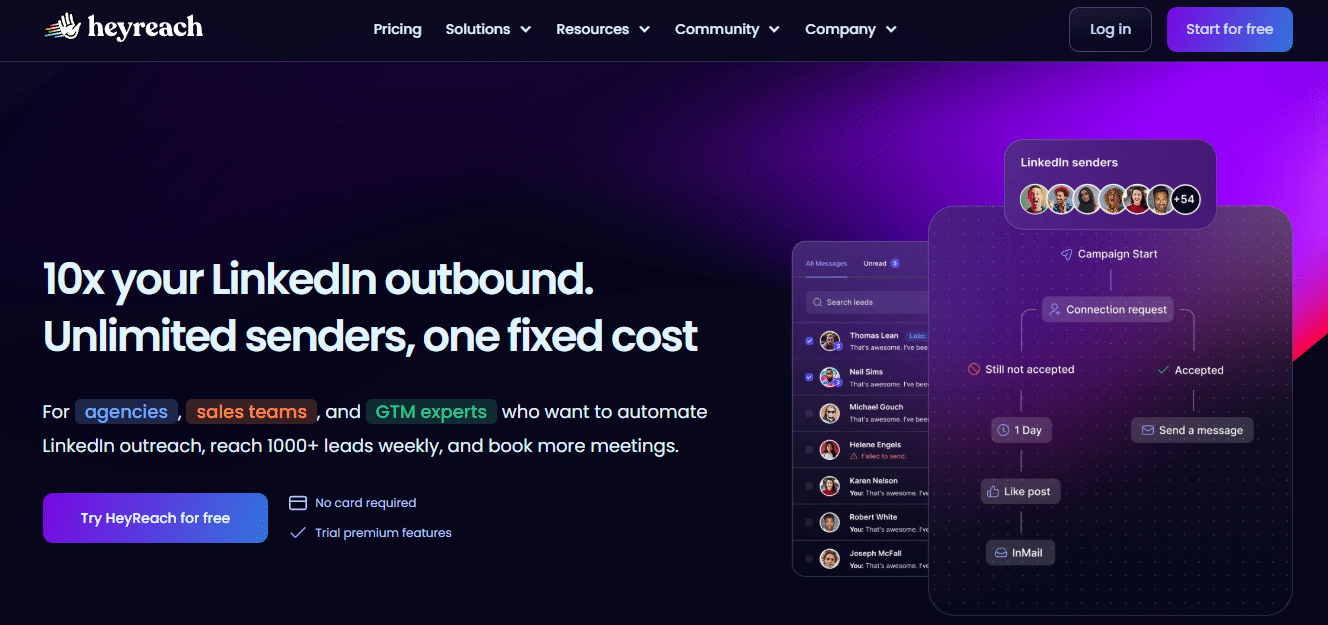
HeyReach was built around one specific problem: running LinkedIn outreach across multiple accounts at the same time without losing control of account safety, client separation, or reply management. The platform’s design follows from that problem directly.
Rather than pushing a single LinkedIn account toward its daily limit, HeyReach distributes sends across every account you connect, rotating between them automatically.
Each account stays within normal activity ranges. An agency running 10 client accounts through HeyReach can reach over 1,000 prospects per week without any single account sending more than 100 to 150 connection requests. That rotation model is why the platform holds a 4.7 rating on G2, why over 2,000 companies use it as of early 2026, and why it was recognized as a fastest-growing product in its category.
The unified inbox is what makes the agency workflow functional. Account managers read and reply to LinkedIn messages on behalf of any client account from one screen, without logging into that account separately. Each client has its own separated, branded workspace. For an agency managing 20-plus clients, that architecture removes the day-to-day operational friction that makes LinkedIn outreach at scale genuinely difficult to run.
| Starting price | $79/month per seat (Starter); $799/month for up to 50 accounts (Agency) |
| Free trial | 14 days (Starter), 7 days (Agency/Unlimited) |
| G2 rating | 4.7/5 from 65+ reviews |
| Best for | Agencies and multi-account sales teams |
| LinkedIn + email | LinkedIn only |
| Account safety | High, with multi-account rotation |
| Skip if | You are running outreach from a single LinkedIn account |
Key Features
- Multi-account rotation across unlimited LinkedIn senders in a single campaign, with sends distributed automatically across accounts
- Unified inbox for reading and replying on behalf of any sender across all client accounts from one interface
- Full LinkedIn action automation: connection requests, messages, InMails, profile views, post engagement, and follow-up sequences
- Native integrations with HubSpot, Pipedrive, Clay, Make, and Zapier; webhooks and API for custom GTM stacks
- Prospect import from Sales Navigator, CSV, HubSpot, RB2B, or any tool that exports a contact list
- White-label workspace with custom domain, branding, and client-facing dashboards
Pros
- The only tool in this review where outreach volume scales without account restriction risk scaling alongside it
- Agency and Unlimited plan pricing is flat-fee, so adding more senders doesn’t multiply the cost the way per-seat pricing does on every other tool
- First campaign runs in under 15 minutes; the fastest onboarding of any tool here
- Support is staffed by people rather than ticketing queues, which matters when an account disconnects mid-campaign, and you need a fix quickly
- White-label features actually work: custom domain, branding, client dashboards, all of it.
Cons
- AI message personalization is basic: variable insertion rather than anything resembling intelligent personalization
- Client reporting requires manual data export; there is no polished client-facing performance dashboard yet
- A single-account user gets almost none of what makes HeyReach worth paying for; the platform is built for multi-account volume, and one account doesn’t justify the Starter plan cost
- Accounts disconnect more than they should, and the platform does not send an alert when it happens
Pricing
HeyReach charges per LinkedIn sender, not per user: $79/month for one seat, $799/month for up to 50 accounts and 5 workspaces, and $1,499/month for unlimited accounts and up to 10 workspaces. With the annual plan, you will get a -25% discount. Adding team members, clients, or users costs nothing extra. Free trial runs 14 days on the Starter plan and 7 days on Agency and Unlimited.
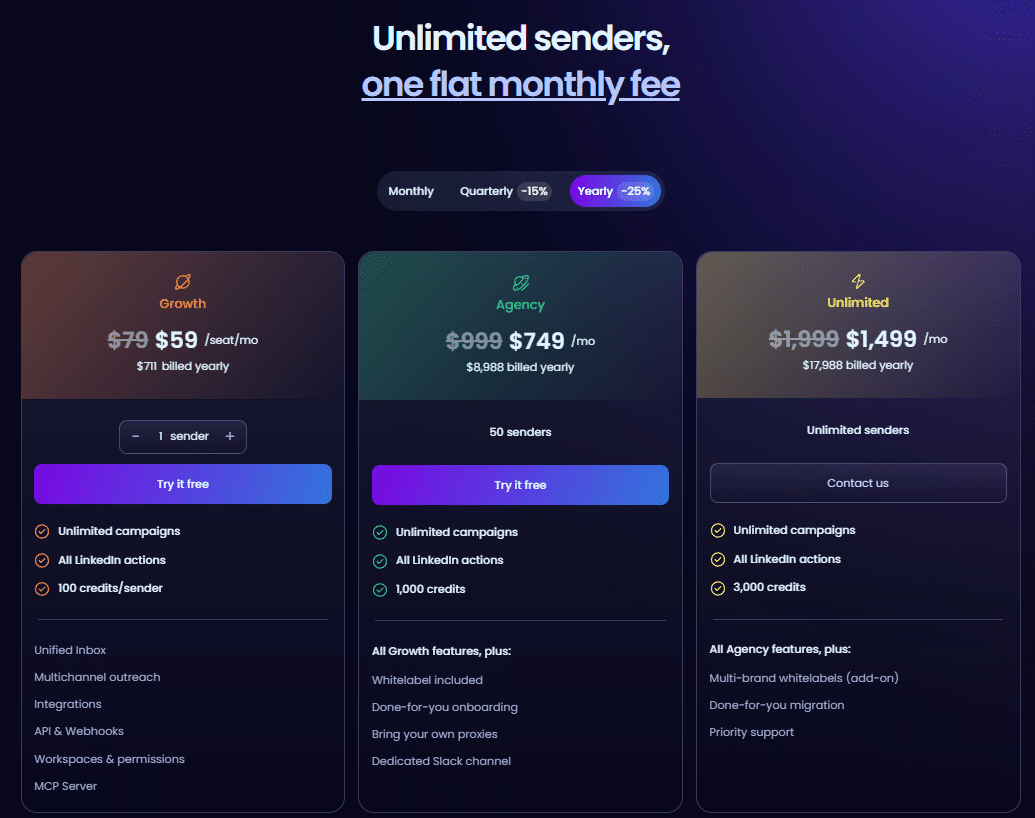
Best for: Lead generation agencies and sales teams managing outreach across multiple client accounts. Every other tool charges per seat, which gets expensive fast as the operation grows.
Meet Alfred, the best LinkedIn automation tool for multi-channel outreach on a budget
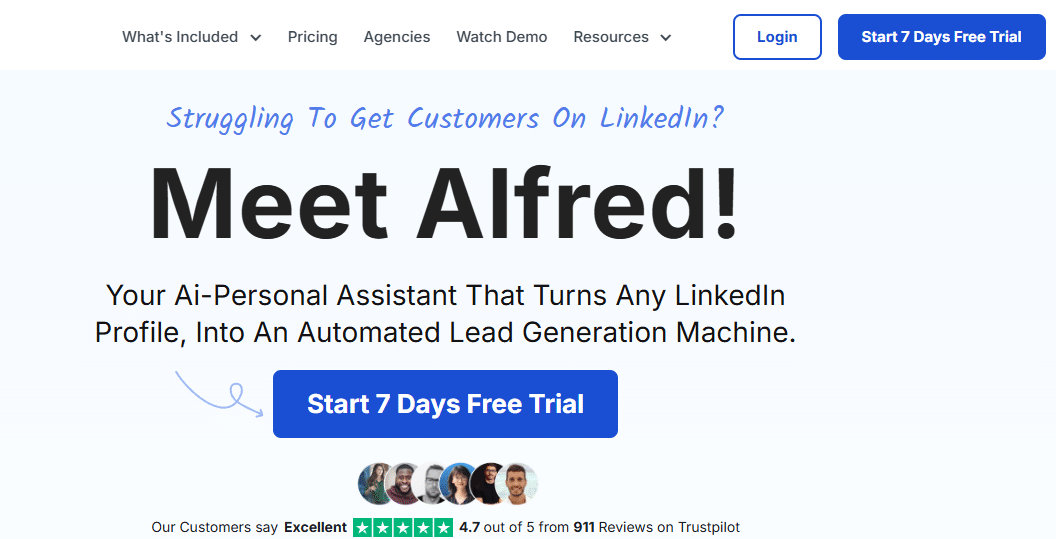
Meet Alfred has been running since 2016 and serves over 78,000 users across 87 countries. The core offering is LinkedIn, email, and Twitter outreach running from one platform in the cloud without requiring a browser to stay open. For founders and small sales teams who want to reach prospects across channels without managing multiple tool subscriptions, that simplicity is the product.
The email side works, but don’t expect it to compete with tools built specifically for email. People who sign up hoping for that tend to be let down. The Twitter integration is there, but you can only schedule posts, send personalized DMs, and run multi-channel campaigns. Alfred makes sense when LinkedIn is doing most of the work, and email is just following up.
The real argument for Alfred is that everything lives in one place. One login, one place to build campaigns, one inbox, one view of what is working across all three channels. For a solo founder or a small team sending a few dozen outreach touches a week, not having to switch between tools is worth the trade-off.
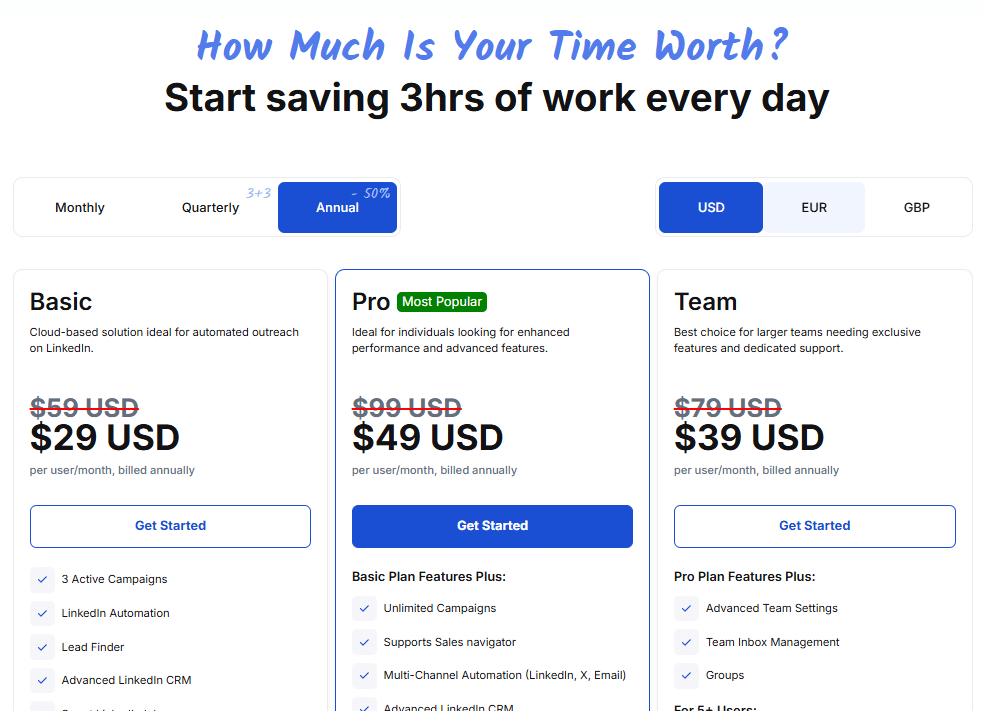
| Starting price | $59/month (annual billing) |
| Free trial | 7 days |
| Ratings | G2: 3.4/5, 4.4/5 on Trustpilot |
| Best for | Founders and small teams wanting LinkedIn + email + Twitter in one tool |
| LinkedIn + email | Yes, both channels in one sequence |
| Account safety | Moderate, no dedicated IPs |
| Skip if | You need reliable uptime or manage multiple LinkedIn accounts for clients |
Key Features
- LinkedIn automation: connection requests, profile views, InMails, and follow-up message sequences
- Multi-channel sequences running LinkedIn to email to Twitter in a single campaign flow, with reply detection at each step
- Built-in CRM: tag leads, add notes, track conversation history, and monitor campaign performance
- Native integrations with HubSpot, Salesforce, and Pipedrive; 3,000-plus tools via Zapier
- 600-plus message templates across connection requests, follow-ups, and InMails
- Reply detection that stops the sequence the moment a prospect responds, so automated messages do not follow a real conversation
Pros
- Fastest setup in this review for users with no prior LinkedIn automation experience
- Combines LinkedIn, email, and Twitter outreach without requiring a second tool subscription
- Cloud-based, so campaigns run regardless of whether your computer is on
- Template library reduces the time from signup to first live campaign
- Entry price of $59/month covers three channels, which is reasonable compared to paying separately
Cons
- Reliability is Alfred’s most documented problem across review platforms: campaigns stop without error messages, messages fail to send on schedule, data does not sync between channels at the rate users expect. This pattern shows up consistently enough in G2 and Trustpilot reviews that it reflects how the product works.
- Managers cannot reply on behalf of other LinkedIn senders in shared campaigns, which rules it out for anyone running outreach across more than one LinkedIn account
- G2 rating of 3.4 is the lowest of any tool in this review, and the user base is large enough that the rating reflects a real signal
- Customer support is slow to respond and inconsistent in resolving issues
- Account restriction risk is higher than tools operating with dedicated IP addresses
Pricing
Personal plan starts at $59/month on annual billing. Teams pricing depends on size. Every plan comes with a 7-day free trial, and you can pay monthly if you prefer, just at a higher rate.
Best for: Founders and small sales teams who need LinkedIn and email outreach running from one platform and can work around the reliability issues that come with that consolidation.
Expandi, the best LinkedIn automation tool for sales teams with complex sequences
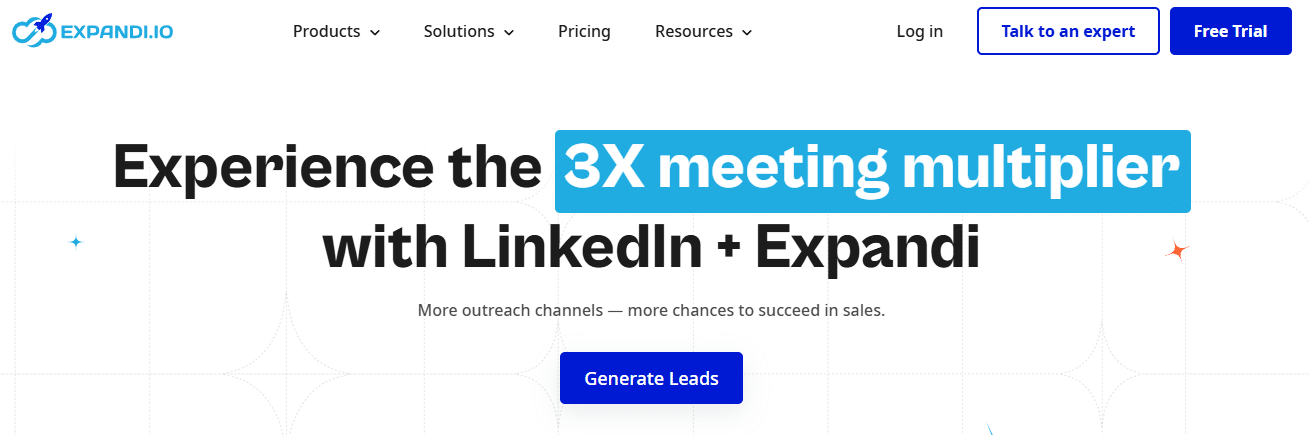
Expandi is for sales teams that have already sorted their targeting and messaging and need precise control over what the campaign does after a prospect interacts with a step or doesn’t interact with it.
Most LinkedIn automation tools run a linear flow: connect, wait, message, wait, follow up. Expandi’s Smart Sequence builder branches instead.
A prospect accepts your connection request and one path triggers. If they don’t accept within five days and a different path triggers: maybe an InMail, an email, a profile view to stay visible without pushing further.
You can build up to 10 actions with 10 conditions per sequence. For a B2B sales team running outreach across a segmented list where different personas need different follow-up logic, that conditional structure removes a lot of manual campaign management.
Expandi runs in the cloud with a dedicated country-based IP address per account, which produces lower LinkedIn detection risk than shared-IP solutions or browser extensions. The platform holds a 4.2 rating on G2 and has documented case studies of agencies building seven-figure ARR using it as their primary LinkedIn outreach tool.
The price is the sticking point. At $99/month per seat, it is the most expensive option in this review on a per-seat basis. An agency running 10 client accounts is looking at $990/month before paying anything else. The personalization features Expandi puts front and center, like personalized images through Hyperise and video through Sendspark, cost extra on top of that. Hyperise adds $69/month, Sendspark adds $49/month. Neither is included in the base price.
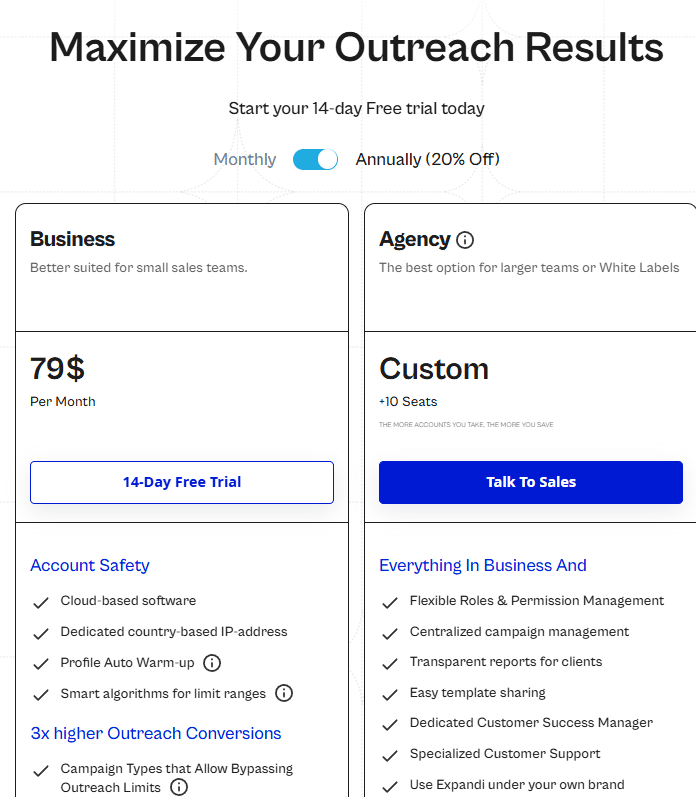
| Starting price | $99/month per seat ($79/month annual) |
| Free trial | 7 days, no credit card required |
| G2 rating | 4.2/5 |
| Best for | B2B sales teams needing conditional campaign logic |
| LinkedIn + email | Limited email follow-up built in |
| Account safety | High, with dedicated country-based IP per account |
| Skip if | You manage multiple client accounts or need to reply on behalf of other senders |
Key Features
- Smart Sequence builder with conditional branching based on whether a prospect accepted, replied, ignored, or engaged, supporting up to 10 actions and 10 conditions per campaign
- Dynamic personalisation with custom variables and personalised images via Hyperise integration (Hyperise costs extra)
- Dedicated country-based IP address per account, reducing LinkedIn restriction risk compared to shared-IP or extension-based tools
- Built-in A/B testing for message variations within a live campaign
- Mobile Connector campaign that simulates mobile behavior to send an additional 70 to 105 connection requests per week
- Gradual account warm-up over the first weeks on any new account to avoid triggering spam detection
Pros
- Deeper conditional sequence logic than any other tool in this review; useful specifically for teams running different follow-up paths based on what a prospect does
- Dedicated IPs per account provide a real safety advantage over shared-IP and browser-extension alternatives
- 7-day free trial with no credit card required
- A/B testing built into the platform rather than requiring a third-party integration
- Customer support is well-reviewed and onboarding resources are thorough
Cons
- At $99/month per seat, the base price is already the highest in this review, and that is before you add Hyperise and Sendspark for the personalization features Expandi puts in its marketing. Add those, and the real cost per seat jumps to $217/month minimum.
- Managers cannot reply on behalf of other senders in the inbox, which means agencies cannot centralise response management the way HeyReach allows
- Some users report being charged after cancellation; Expandi recommends confirming cancellations in writing
- Account restrictions still happen at aggressive activity levels even with dedicated IPs; the safety mechanism lowers the probability, but it doesn’t remove it
- No native multi-account rotation; scaling across accounts requires separate seat licenses, which get expensive quickly for agencies
Pricing
One plan, no tiers: $99/month per seat, or $79/month billed annually ($950/year). Everything is included. With the free trial, you have 7 days with full access and no credit card, and if you pay and change your mind after the trial, there is a 7-day money-back guarantee.
Best for: B2B sales teams and SDRs running LinkedIn prospecting campaigns where different follow-up paths based on prospect behavior are what make the campaign work.
PhantomBuster is best for building LinkedIn lead lists before your outreach begins
PhantomBuster is a data extraction and automation platform. Calling it a LinkedIn outreach tool sets the wrong expectations for anyone evaluating it. LinkedIn is one of 15-plus platforms it covers. It’s 130+ pre-built automation scripts, called Phantoms, scrape, enrich, and process data across LinkedIn, Twitter, Instagram, Facebook, Google Maps, and others.
You can automate connection requests and message sequences through PhantomBuster. The platform’s real value is upstream of outreach: building the qualified list that an outreach tool then works through.
When a prospecting process starts with extracting attendees from a LinkedIn event or pulling every company from a Sales Navigator search with their email addresses verified, PhantomBuster handles that phase better than any dedicated outreach tool in this review. Pair it with HeyReach, Expandi, or Dux-Soup for the outreach layer. Running PhantomBuster as a standalone outreach tool means using its weakest capability while ignoring its strongest ones.
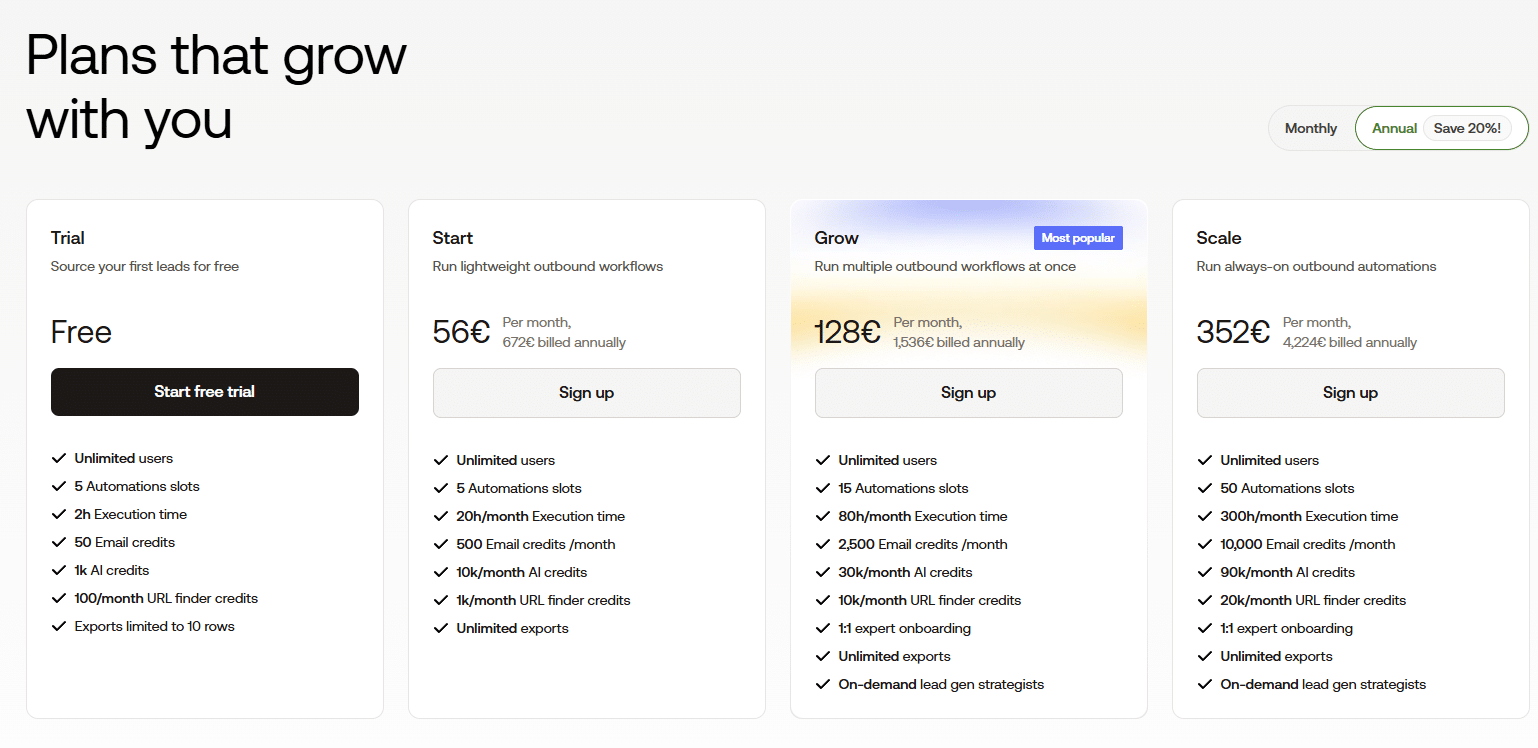
The workspace pricing model shows who the platform was built for. Per-seat tools multiply the cost with each additional user. PhantomBuster charges by execution hours, email credits, and phantom slots, which are team-level resources shared across users. One Team plan at $352/month supports a 15-person sales operation more cost-effectively than five individual seats on most per-seat competitors.
| Starting price | $56/month (annual, workspace pricing) |
| Free trial | 14 days, no credit card required |
| G2 rating | 4.4/5 |
| Best for | Teams building and enriching lead lists before outreach |
| LinkedIn + email | Yes, with data extraction and email enrichment |
| Account safety | Moderate, it requires LinkedIn session cookie |
| Skip if | You need a standalone outreach sequencing tool; PhantomBuster is a data layer, not a campaign runner |
Key Features
- 130-plus Phantoms covering LinkedIn profile scraping, Sales Navigator extraction, connection requests, message sequences, Twitter data, Instagram, Facebook, Google Maps, and others across 15-plus platforms
- Phantom chaining into Flows, where the output of one automation feeds directly into the next without manual intervention
- AI credits for message personalisation and profile analysis, included in paid plans
- Email credits for contact enrichment and email address discovery
- Native bidirectional HubSpot integration on all plans; Salesforce and Pipedrive connect via Zapier or Make
- Cloud-based execution with results exporting directly to CSV, Google Sheets, or CRM
Pros
- The only tool in this review that handles pre-outreach data work at scale: extract, enrich, qualify, then hand off to a dedicated outreach tool
- 14-day free trial with no credit card and full feature access, long enough to validate the tool against a real use case
- Workspace pricing becomes significantly more cost-effective as team size grows past five or six users
- Pre-built Phantom library lets non-technical users deploy complex automation without writing anything
- Native HubSpot sync removes the Zapier layer for teams already running on HubSpot
Cons
- The learning curve is not about the interface being hard to use; it is about understanding how execution hours, phantom slots, and email credits interact before accidentally draining the monthly allocation mid-campaign
- Automations break when LinkedIn pushes interface updates, sometimes overnight; there is a waiting period while PhantomBuster’s team patches the affected Phantom
- The tool requires your LinkedIn session cookie, which introduces account risk that cloud-based tools running with dedicated IPs avoid
- Running extraction at full speed without pacing triggers LinkedIn account restrictions as reliably as pushing any other tool past safe limits
- As a standalone outreach tool, PhantomBuster is underpowered; the sequence logic and reply management lag behind dedicated outreach tools
Pricing
Starter: $56/month (annual) with 20 execution hours, 500 email credits, and 5 phantom slots. Pro: $128/month (annual) with 80 execution hours, 2,500 email credits, and 15 phantom slots. Team: $352/month (annual) with 300 execution hours, 10,000 email credits, and 50 phantom slots. 14-day free trial with no credit card; data exports are capped at 10 rows per result during the trial period.
Best for: Growth teams and sales operations that need to extract and enrich lead lists from LinkedIn, Sales Navigator, or other platforms before running outreach, rather than teams looking for a standalone sequencing tool.
Dux-Soup, the most affordable LinkedIn automation tool for individual users
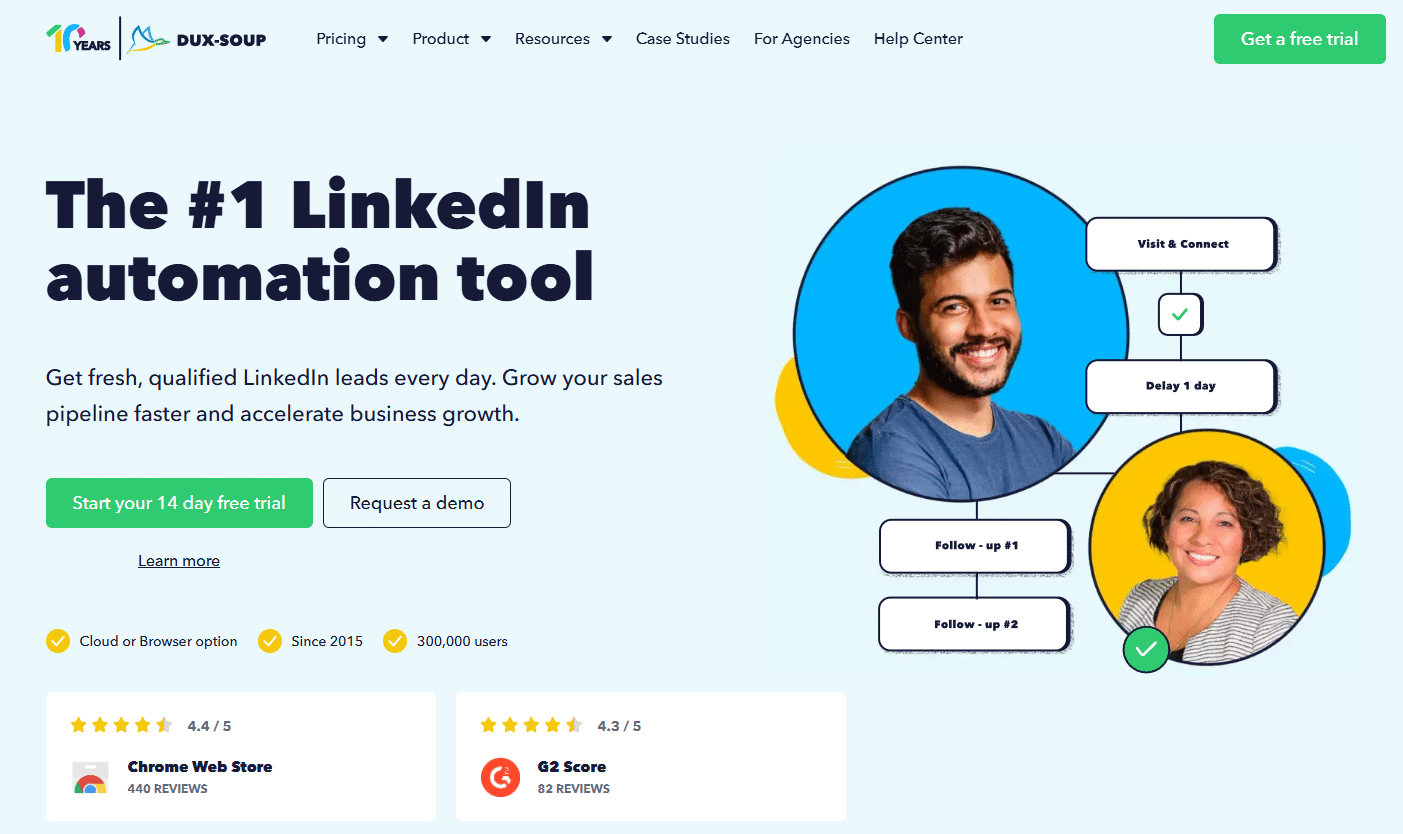
Dux-Soup has been in this market since 2015, and over 300,000 users run it today. LinkedIn has changed its interface, tightened its limits, and updated its detection systems repeatedly over that period, and Dux-Soup has kept pace with each change. In a category where tools built on browser automation can stop working overnight after a LinkedIn update, a decade of continuous operation means something.
The lower-tier plans run as a Chrome extension, which means campaigns pause when your browser closes or your laptop goes to sleep. The Cloud plan removes that constraint, though the Cloud plan costs $99/month, which erases the pricing advantage that makes Dux-Soup worth considering at the individual user level in the first place.
Dux-Soup works well for individual users and small teams doing LinkedIn-only outreach on the Pro or Turbo plan. The moment you need campaigns running while your computer is off or you are managing more than one account, you are looking at the Cloud plan at $99/month. At that price, you are basically choosing between Dux-Soup and Expandi, which is a much closer call than the entry-level pricing makes it seem.
What separates Dux-Soup from other tools at this price range is LinkedIn Recruiter support. Every other tool in this review works with standard LinkedIn and Sales Navigator. Dux-Soup also works with LinkedIn Recruiter, which matters for recruiters and talent teams whose primary environment is Recruiter rather than the standard interface.
The CRM integrations are also more developed than newer tools at comparable prices; campaigns can be triggered directly from Salesforce or HubSpot without opening Dux-Soup separately.
| Starting price | $14.99/month (Pro Dux); $99/month for always-on Cloud Dux |
| Free trial | 14 days, no credit card required |
| G2 rating | 4.3/5 from 469 reviews |
| Best for | Individual users, recruiters, and small teams on LinkedIn only |
| LinkedIn + email | LinkedIn only |
| Account safety | Moderate on browser extension, higher on Cloud plan |
| Skip if | You need always-on campaigns but cannot justify $99/month, or you manage multiple client accounts |
Key Features
- Automates profile visits, connection requests, message sequences, InMails, follows, endorsements, and post likes
- Drip campaigns with multi-step sequences and configurable time delays between each action
- Funnel Flow dashboard that tracks every prospect through every campaign stage with full activity history
- Profile tagging for segmenting connections into targeted groups for different message flows
- Native bidirectional CRM integrations with Salesforce, HubSpot, Pipedrive, Freshsales, and Woodpecker; Slack and Microsoft Teams for notifications
- Cloud Dux plan runs campaigns from Dux-Soup’s infrastructure rather than your local machine
- Works with standard LinkedIn, Sales Navigator, and LinkedIn Recruiter; the only tool in this review supporting all three
Pros
- A decade on the market with continuous updates, more operational stability than most tools in this category
- LinkedIn Recruiter support is a practical advantage for recruiters and talent acquisition teams that no other tool in this review offers
- CRM integration is mature; you can trigger and manage campaigns from inside Salesforce or HubSpot without going into Dux-Soup
- Campaign configuration is granular; experienced users get precise control over delays, throttles, and follow-up logic
- Pro plan at $14.99/month is the lowest entry price in this review
- 14-day free trial on every plan, with no credit card required
Cons
- On the Chrome extension plans, campaigns stop the moment your browser closes; there is no background execution and no alert when it happens
- The Cloud plan at $99/month solves that problem, but puts the cost level with Expandi’s entry price
- The interface is visibly dated; it functions, but it looks like software from 2018, which it largely is
- Browser extension plans carry a higher LinkedIn detection risk than cloud-based tools with dedicated IPs
- Per-account pricing stacks up fast for anyone managing more than two or three LinkedIn accounts simultaneously
Pricing
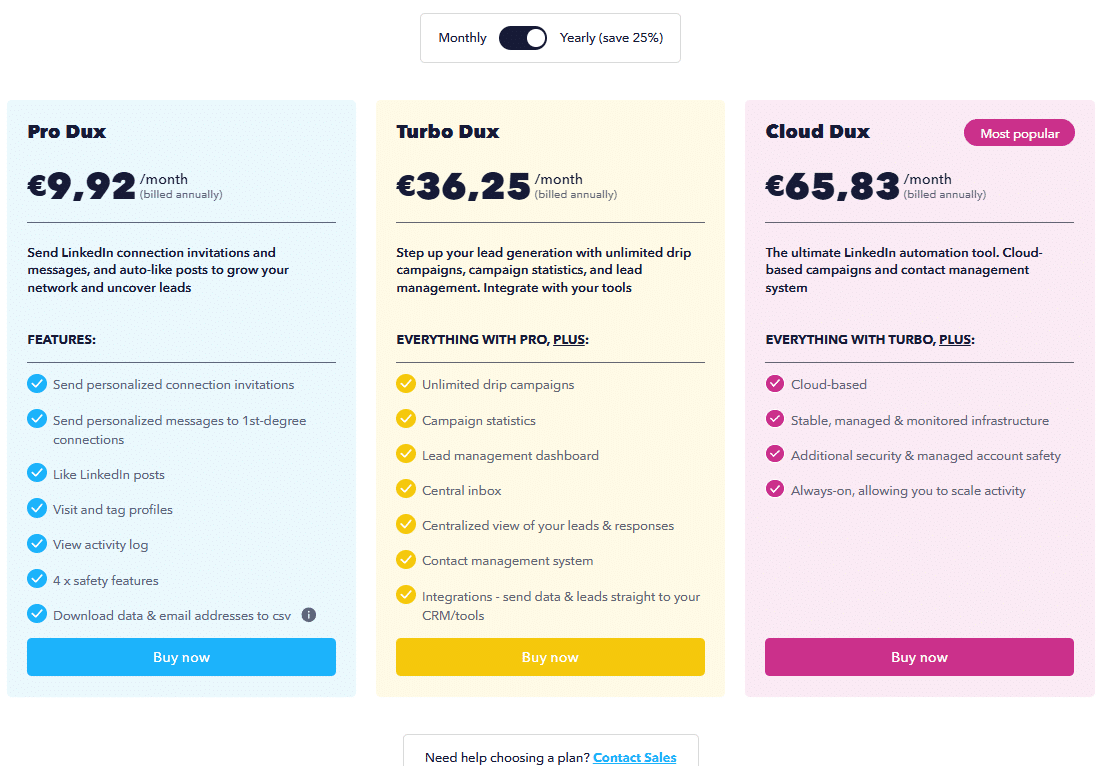
There are 3 plans to choose from: Pro Dux at $14.99/month (or $11.25 if you pay annually), Turbo Dux at $55/month (or $41.25 annually), and Cloud Dux at $99/month (or $74.17 annually). Every plan comes with a 14-day free trial and no credit card required, which is the longest trial period of any tool in this review.
Best for: Individual users, recruiters, and small sales teams running LinkedIn-only outreach who need granular campaign control at the lowest entry price available, and who either accept the browser dependency on lower tiers or can justify upgrading to the Cloud plan.
GTM Brigade, the best LinkedIn tool for teams building pipeline through social selling
Full disclosure: GTM Brigade was co-built by the Milk & Cookies Studio team and is used in our client work. We included it here because it solves a problem none of the other five tools address. And to sweeten the deal, here’s our discount code for you: COOKIES for 7,000 extra trial credits.
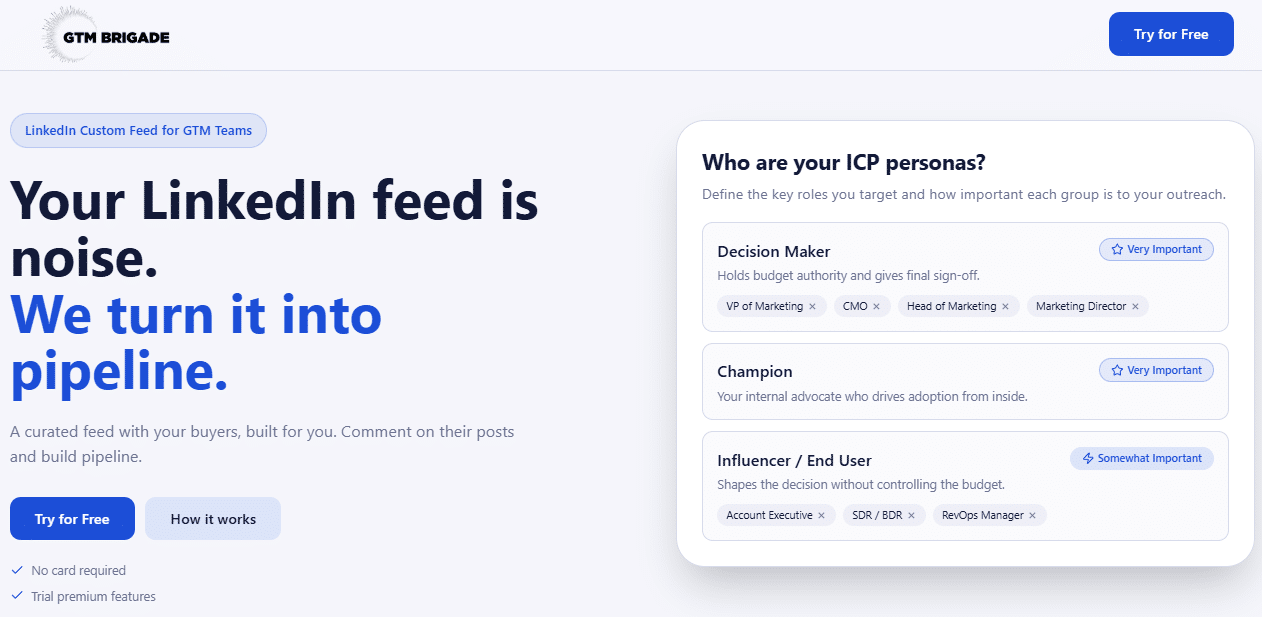
Every tool reviewed above operates on the same assumption: find prospects, send them a connection request, follow up with messages, and book a meeting. GTM Brigade works differently. It doesn’t send outreach at all, but instead it gives you a filtered LinkedIn feed that shows only posts from your ICP, the exact people you want to reach, so your team can comment on those posts with substance, build visibility with the right audience, and open conversations without ever sending a cold message.
The insight behind it is simple: LinkedIn’s connection limits have made cold outreach harder to scale, but the comment section has no limits. A well-placed comment on a prospect’s post is visible to everyone in their network, positions you as a peer rather than a vendor, and starts a conversation in context rather than in a cold inbox. The problem is that doing this manually, scrolling LinkedIn every morning, hoping the right posts show up, doesn’t work. The feed algorithm shows you what got the most engagement, not your ICP. GTM Brigade replaces the algorithm with your prospect list.
The first real test at Omniconvert ran their sales team on a curated ICP feed for two months. Results? Four deals closed, tracked back to LinkedIn conversations started through the platform.
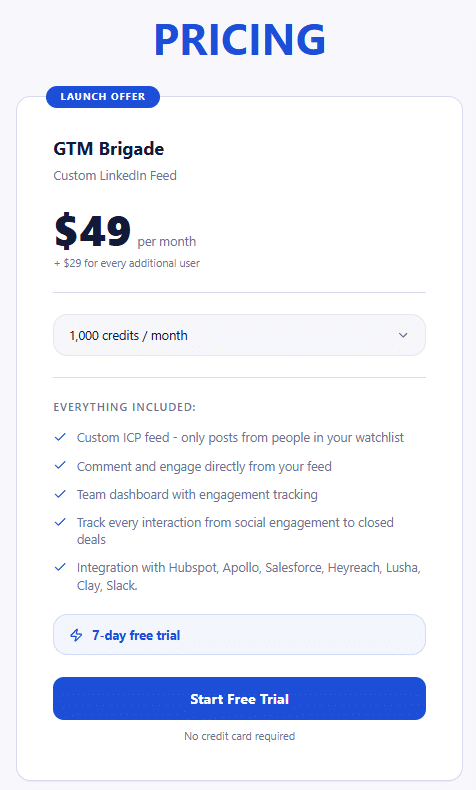
| Starting price | $49/month (1,000 credits); $29/month per additional user |
| Free trial | 7 days, no credit card required |
| G2 rating | Early stage; not yet rated |
| Best for | Sales and marketing teams wanting to build pipeline through LinkedIn engagement rather than cold outreach |
| LinkedIn + email | LinkedIn engagement only |
| Account safety | No automation, no ToS risk. All actions are manual |
| Skip if | You need volume outreach at scale; GTMBrigade is not a sequencing tool |
Key Features
- Custom ICP feed: load your prospect list from Sales Navigator, your CRM, or LinkedIn connections and see only their posts
- Comment and engage directly from the feed without switching to LinkedIn separately
- AI comment suggestions are trained on your knowledge base and matched to your tone of voice, so suggestions sound like you rather than a generic template
- Team dashboard with engagement tracking so managers can see who is active and which conversations are moving
- Attribution tracking from social engagement through to closed deals
- Integrations with HubSpot, Apollo, Salesforce, HeyReach, Lusha, Clay, and Slack
Pros
- No LinkedIn ToS risk. Every action is manual, nothing is automated, so there is no account restriction exposure
- Replaces the noise of the default LinkedIn feed with a focused list of exactly the people you are trying to reach
- Team coordination feature solves the “be more active on LinkedIn” problem by making it obvious where to engage, rather than leaving it to individuals to figure out
- AI comment suggestions are built around your knowledge base. The output reflects your actual point of view
- Attribution from comment to closed deal is a feature that no other tool in this review offers
- Full integration with the tools most sales teams are already running
Cons
- No outreach volume. If your goal is to reach 500 new prospects a week through connection requests and follow-ups, GTM Brigade does not do that
- Early-stage product. The feature set is still growing, and some users will hit limitations that more mature tools have already solved
- Results depend heavily on comment quality; the tool gives you the right feed and AI suggestions, but a weak comment in front of the right person still produces nothing
- The credits model requires monitoring. 1,000 credits per month on the base plan, and heavy team usage can exhaust the allocation before the month ends
- No G2 or Trustpilot rating base yet, so there is limited independent third-party review data available
Pricing
$49/month for one user with 1,000 credits per month, plus $29/month for every additional team member. Everything is included in one plan: custom ICP feed, AI comment suggestions, team dashboard, attribution tracking, and all integrations. A 7-day free trial is available with no credit card required.
Best for: Sales and marketing teams that want to build pipeline through consistent, structured LinkedIn engagement with their ICP rather than cold outreach sequences. Particularly useful when paired with HeyReach or Expandi. GTMBrigade warms up the relationship through comments, and the outreach tool closes the gap with a connection request to a prospect who already recognises you.
How these 6 LinkedIn tools compare
| HeyReach | Meet Alfred | Expandi | PhantomBuster | Dux-Soup | GTMBrigade | |
|---|---|---|---|---|---|---|
| Starting price | $79/mo/seat | $59/mo | $99/mo/seat | $56/mo (workspace) | $14.99/mo | $49/mo |
| Free trial | 7-14 days | 7 days | 7 days | 14 days | 14 days | 7 days |
| Cloud-based | Yes | Yes | Yes | Yes | Cloud plan only | Yes |
| Multi-account rotation | Yes, core feature | No | No | No | No | No |
| LinkedIn + email | LinkedIn only | Yes | Limited | Yes | No | LinkedIn only |
| Sales Navigator | Yes | Yes | Yes | Yes | Yes | Yes |
| LinkedIn Recruiter | No | No | No | No | Yes | No |
| Sends cold outreach | Yes | Yes | Yes | Yes | Yes | No |
| Best for | Agencies, multi-account | Founders, small teams | Sales teams, SDRs | Data extraction | Individuals, recruiters | Social selling teams |
| G2 rating | 4.7 | 3.4 | 4.2 | 4.4 | 4.3 | Early stage |
| Account safety | High, rotation model | Moderate | High, dedicated IPs | Moderate | Moderate on extension, higher on Cloud | No risk, fully manual |
Which LinkedIn outreach tool is right for you
If you run a lead generation agency or manage LinkedIn outreach for multiple clients, choose HeyReach because flat-fee multi-account pricing and built-in account rotation make it the only tool here that scales agency operations without per-seat cost compounding. Every other tool in this list charges per account.
If you are a founder or solo sales rep who needs LinkedIn and email outreach from one platform, choose Meet Alfred because it’s the most accessible multi-channel option at this price point, and it gets the job done without requiring a second tool subscription.
If you are on a B2B sales team running structured LinkedIn prospecting and need different follow-up paths based on what a prospect does, choose Expandi because its conditional sequence builder is the most developed in this category. Factor in the real cost: $99/month per seat plus Hyperise if you want personalised images.
If your prospecting starts with list building before it starts with sending messages, choose PhantomBuster because no other tool here handles Sales Navigator extraction, LinkedIn event scraping, and multi-platform data enrichment at the same depth. Pair it with a dedicated outreach tool rather than expecting it to replace one.
If you want a proven LinkedIn-only automation tool at the lowest entry price available, choose Dux-Soup because the Pro plan at $14.99/month is the cheapest credible option in this review and the CRM integrations are mature. If you need campaigns running overnight, upgrade to Cloud Dux; the browser extension stops the moment your computer sleeps.
If your team wants to build pipeline through LinkedIn engagement rather than cold outreach, choose GTM Brigade because it replaces the noise of the default LinkedIn feed with a curated stream of your ICP’s posts, so your team comments with substance where it matters every day. It pairs well with any outreach tool. Use GTM Brigade to warm up relationships through comments, then convert them with a connection request through HeyReach or Expandi.
Key things to remember
- Five of the six tools in this list operate in violation of LinkedIn’s Terms of Service. GTM Brigade is the exception, because it makes no automated actions. Cloud-based tools with dedicated IPs carry a lower restriction risk than browser extensions.
- The tool does not generate results. Your prospect list, your message, and the offer behind it generate results. The tool scales what is already working or accelerates what is not working faster.
- LinkedIn’s safe connection limits in 2026 are 20 to 40 requests per day, 100 to 200 per week. Pushing past those thresholds trades your account’s long-term health for short-term volume.
- Test any new tool on a secondary LinkedIn account before connecting it to your primary. A restricted account with years of connections is not something you rebuild easily.
- The right tool depends entirely on your situation. HeyReach is better for agencies, Expandi for complex sequences, Dux-Soup for individuals, PhantomBuster for data, Meet Alfred for multi-channel outreach on one budget, and GTM Brigade for teams building pipeline through LinkedIn engagement rather than cold outreach.
If you are a B2B tech company building a LinkedIn outbound motion for a new market and need help with the system behind the tool (the ICP definition, the message architecture, the sequence logic, and the go-to-market playbook that makes outreach convert), let’s talk.
Frequently asked questions
What is the best LinkedIn automation tool for agencies in 2026?
HeyReach. Its multi-account rotation keeps every client account within safe daily limits while total outreach scales with the number of senders connected. The flat agency pricing at $799/month for up to 50 accounts is the only pricing model in this category that does not compound per client. Account managers reply on behalf of any client from a unified inbox without logging into separate accounts. No other tool reviewed here is built specifically for agency operations at that level.
Are LinkedIn automation tools safe to use?
None of them are fully safe. LinkedIn’s Terms of Service prohibit automated access, and that applies to every tool in this review. What varies is the degree of risk. Cloud-based tools with dedicated IP addresses per account carry lower detection risk than browser extensions because they produce more natural-looking activity patterns. Account age is also a factor: a three-month-old account sending 50 connection requests per day will be flagged faster than a five-year-old account doing the same. Low acceptance rates below 20% compound the risk regardless of which tool you use, because LinkedIn reads ignored requests as a spam signal.
How many LinkedIn connection requests can I send per day using automation?
Safe daily limits in 2026 sit at 20 to 40 connection requests per day, which is 100 to 200 per week. New accounts should start at 5 to 15 per day and scale up gradually over several weeks. LinkedIn’s enforcement watches burst patterns more than total volume, so distributing requests across the day matters as much as the daily count. If your acceptance rate drops below 20%, reduce volume immediately.
What is the difference between a LinkedIn automation tool and a LinkedIn outreach tool?
In practice, the terms refer to the same category. LinkedIn automation tools automate actions within LinkedIn: connection requests, messages, profile visits, endorsements, and follow-ups. LinkedIn outreach tool is a broader label that includes platforms combining LinkedIn with email and other channels. Most tools in this review fit both descriptions to varying degrees. PhantomBuster is the exception on the data side: it is a data extraction platform first, with outreach automation as a secondary capability. GTMBrigade is the exception on the engagement side: it doesn’t automate or send outreach at all, but it structures manual commenting and social selling activity.
Can I use these LinkedIn automation tools with Sales Navigator?
Yes. All five outreach tools in this review support LinkedIn Sales Navigator. HeyReach, Expandi, Meet Alfred, and Dux-Soup allow direct prospect import from Sales Navigator searches. PhantomBuster can scrape Sales Navigator results and export them into structured lists for enrichment or outreach. GTMBrigade also connects to Sales Navigator to build your ICP watchlist. Dux-Soup is the only tool here that also works with LinkedIn Recruiter, which matters for recruiters and talent teams who operate primarily in that environment.
What happens if LinkedIn detects I am using an automation tool?
Enforcement escalates in stages. The first signal is usually throttling: LinkedIn quietly reduces how many of your connection requests are delivered or how many people your InMails reach, without telling you. If the pattern continues, you receive a warning and a temporary restriction on sending, typically lasting a few days to a few weeks. Persistent violations lead to permanent account restriction. Browser extension tools trigger this sequence faster than cloud-based tools with dedicated IPs, and new accounts are more vulnerable than established ones.
Do I need LinkedIn Sales Navigator to use these tools?
No. Every tool in this review works with a standard LinkedIn account. Sales Navigator expands your targeting options and most tools import from it directly, which helps when you need precise filtering by company headcount, seniority, or recent job changes. For general outreach against a broad audience, a standard account works.
What is the cheapest LinkedIn automation tool?
Dux-Soup’s Pro plan at $14.99/month, or $11.25/month billed annually, is the lowest entry price in this review. PhantomBuster’s Starter plan at $56/month is next, with workspace pricing that gets more cost-effective as team size grows. GTM Brigade starts at $49/month for one user. Meet Alfred starts at $59/month. HeyReach starts at $79/month per seat for individual use but becomes significantly more cost-efficient at the Agency plan level. Expandi at $99/month per seat is the most expensive per-seat option here.
Can these tools send email outreach alongside LinkedIn messages?
Meet Alfred and PhantomBuster both support email outreach alongside LinkedIn. Expandi includes limited email follow-up within its sequences. HeyReach, Dux-Soup, and GTM Brigade are LinkedIn-only. GTM Brigade is worth noting here because it takes a different approach entirely, rather than sending outreach messages. It structures your team’s commenting activity on your ICP’s posts, which means email is not part of the picture at all. For teams that need LinkedIn and email running as a coordinated sequence from one platform, Meet Alfred is the most accessible option in this review, though its email deliverability infrastructure is less developed than dedicated tools like Instantly or Smartlead.